28JUL2026
What Is Drip Feed in an SMM Panel? A Simple Guide For Beginners
Table of Contents
Drip feed in an SMM panel means delivering followers, likes, views, subscribers, or other engagement slowly over time instead of sending the full order at once.
For example, if you order 1,000 Instagram followers, normal delivery may send them quickly. With drip feed, the panel may deliver 100 followers every few hours or spread the order over several days. This makes the growth look more gradual and controlled.
Many creators, businesses, freelancers, agencies, and resellers use drip feed to make social media growth look more natural. It is especially useful for larger orders, new accounts, client campaigns, and posts that need steady engagement.
However, drip feed is not magic. It only controls the delivery speed. Service quality, refill rules, platform behaviour, and your content still matter.
TL;DR
- Drip feed delivers SMM panel orders slowly over time.
- It helps avoid sudden spikes in followers, likes, views, or engagement.
- It uses settings such as quantity, runs, and interval.
- It works best for larger orders, new accounts, and campaign-based growth.
- Drip feed can look more natural than instant delivery.
- It does not guarantee safety because service quality still matters.
- Start small, use realistic intervals, and never share your password.
What Problem Does Drip Feed Solve?
Drip feed solves the problem of sudden and unnatural-looking growth. When followers, likes, views, or subscribers arrive all at once, the increase can look unusual, especially on a new or inactive account.
With drip feed, the order is delivered over time. This makes the growth pattern look more balanced and realistic.
For example, receiving 1,000 followers in a few minutes may look unusual. Receiving 100 followers every few hours can feel more natural. The same idea applies to Instagram likes, YouTube views, TikTok engagement, Facebook reactions, and Telegram members.
Drip feed mainly helps users avoid:
- Sudden follower spikes
- Fake-looking engagement
- Overloading a new account
- Unnatural delivery patterns
- Poor campaign timing
- Too much engagement arriving at once
It also gives creators, businesses, freelancers, agencies, and resellers better control over delivery speed. Instead of sending everything at one time, they can spread the order across several hours or days.
How Does Drip Feed Work?
Drip feed breaks one SMM panel order into smaller parts and delivers them over time. Instead of sending the full order at once, the panel follows a delivery schedule based on the quantity, interval, and number of runs you select.

For example, if you order 1,000 Instagram followers, drip feed may deliver 100 followers every few hours until the full order is completed. This makes the growth look slower and more controlled than receiving everything at once.
Most drip feed orders include these settings:
- Order quantity: The amount delivered in each run or the total campaign amount, depending on the panel.
- Delivery interval: The time gap between each delivery cycle.
- Run count: The number of times the order repeats.
Note: Most panels do not provide a separate start-time field. The first run usually begins when the order is accepted, and the interval countdown starts from that moment.
The exact setup depends on the panel and selected service. Some panels provide more control over drip feed settings, while others use a simpler system.
Drip Feed vs Instant Delivery: What’s the Difference?
The main difference between drip feed and instant delivery is delivery speed. Instant delivery sends the full order quickly, while drip feed spreads the order over time.

For example, if you order 2,000 followers with instant delivery, the full amount may arrive within a short time. With drip feed, the panel may deliver 100 followers every few hours until the full order is completed.
| Feature | Drip Feed | Instant Delivery |
|---|---|---|
| Delivery style | Slow and gradual | Fast and direct |
| Growth pattern | More natural-looking | Can look sudden |
| Best for | Followers, views, likes, and campaigns | Small or urgent orders |
| Control | More control over timing | Less control |
| Spike risk | Lower | Higher if overused |
Drip feed is usually better when you want controlled delivery and gradual-looking growth. It works well for larger orders, new accounts, or campaign-based promotion.
Instant delivery can still be useful for small orders or urgent needs. However, ordering too much too quickly may create a sudden growth pattern.
Drip feed is better for steady delivery, while instant delivery is more suitable when speed matters most.
What Are the Real Benefits of Drip Feed?
Drip feed is often described only as a way to make delivery look more natural. However, its real value is closer to campaign management. Here is what it can actually provide.
It removes repetitive manual ordering: Delivering 3,000 views across ten sessions without drip feed means opening the dashboard ten times, recalculating the quantity, placing ten separate orders, and saving ten order IDs. Drip feed allows you to create the schedule once and lets the panel process the runs automatically.
It creates a Fixed Campaign Rhythm: If you need around 400 likes per day for one week, drip feed can maintain that daily rhythm. With manual ordering, you may forget one day and place twice the amount the next day.
It Reduces One Large Visible Spike: A single delivery of 5,000 followers creates one sharp increase in the profile count. Ten runs of 500 spread the same total across a wider period. This changes the delivery pattern, although it does not change the source or quality of the followers.
It limits your risk per run: Testing an unfamiliar service with 10,000 units in one order risks the entire amount. Delivering 1,000 units first lets you check the start time, delivery speed, and drop behaviour before the remaining runs are released. Some panels may allow you to stop future runs if the first run performs poorly.
It keeps your order records organised: Many panels group drip feed runs under one main order ID, while each run appears as a separate child order with its own start count, delivered quantity, and status. This can make order management easier for agencies and resellers handling several client accounts.
It Matches Content That Stays Live: Evergreen posts, pinned posts, channel pages, and profile-level services can benefit from delivery spread across several days. A post that receives engagement over one week creates a different pattern from a post that receives everything in one hour.
What Do Quantity, Runs, and Interval Mean?
In drip feed, quantity, runs, and interval control how your order is delivered over time. These settings determine how much engagement is delivered, how often the order repeats, and the gap between deliveries.
Quantity
Quantity means how many followers you want to deliver in each run. For example, if you set the quantity to 100 followers, the panel will try to deliver 100 followers each time the order runs.
In some panels, quantity may mean the total order amount. So always check the panel’s instructions before placing the order.
There is also a minimum quantity per run, often 10, 50, or 100 units depending on the service. This is checked against each run, not the campaign total. So a 500-follower order split into 20 runs gives 25 followers per run, and if the service minimum is 50, the panel rejects it even though 500 is well above the service's overall minimum. When that happens, reduce your number of runs rather than raising the total order.
Runs
Runs mean how many times the order will repeat. If you choose five runs, the panel will repeat the selected quantity five times.

For example:
100 followers × 5 runs = 500 followers
Interval
The interval is the time gap between runs, but check the unit before you type anything. Many SMM panels accept the interval in minutes, not hours. A six-hour gap is entered as 360, not 6.
This is the most common drip feed mistake. If you type 6 into a minutes field, your runs will fire six minutes apart, and the whole order will finish in under half an hour instead of spreading across a day.
Here are the values you will use most often:
| Time Gap You Want | Enter in the Interval Field |
|---|---|
| 30 minutes | 30 |
| 1 hour | 60 |
| 3 hours | 180 |
| 6 hours | 360 |
| 12 hours | 720 |
| 24 hours | 1,440 |
| 3 days | 4,320 |
| 7 days | 10,080 |
A few panels use hours or days instead. The unit is usually printed next to the field or shown in the placeholder text, so read it once before your first order on any new panel.
Most panels also apply a minimum interval, commonly 30 or 60 minutes. Anything shorter than that will be rejected when you submit.
If you order 100 followers with five runs and a six-hour interval, the schedule may look like this:
- Run 1: 100 followers
- After 6 hours: 100 more followers
- After another 6 hours: 100 more followers
- The process continues until all five runs are completed
In simple words, quantity is how much, runs are how many times, and interval is how often. These three settings help drip feed deliver followers, likes, views, or engagement slowly instead of all at once.
Why Do SMM Panels Have Different Drip Feed Quantity Models?
SMM panels use different quantity models because not every panel calculates drip feed orders in the same way. Some panels treat quantity as the amount delivered in each run, while others treat it as the total campaign quantity and divide it across the selected runs.

This can depend on the panel software, upstream service provider, platform, and delivery system.
One panel may calculate an order like this:
- Quantity: 100
- Runs: 5
- Total delivery: 500 followers
Another panel may calculate it like this:
- Quantity: 500
- Runs: 5
- Delivery: 100 followers per run
Both are valid drip feed models, but the calculations are different.
Panels also use different models because each service has different delivery limits. Instagram followers, YouTube views, TikTok likes, Telegram members, and LinkedIn engagement may not deliver in the same way.
Some services can handle larger quantities, while others require smaller, slower deliveries to look more natural.
That is why users should always read the drip feed instructions before placing an order. Do not assume every panel uses the same formula. Check whether the quantity means per run or total order amount, then set your runs and intervals carefully.
How Do You Calculate Total Drip Feed Quantity?
Work out your final number by hand before you submit. Which formula you need depends on the quantity model your panel uses, so identify the model first.
Per-Run Model
In the per-run model, the quantity you enter is repeated during every run.
Total delivered = quantity per run × number of runs
If you enter 250 followers with 12 runs, the campaign delivers 3,000 followers in total.
Total-Quantity Model
Here the quantity you enter is the whole campaign, and the panel divides it across your runs.
Amount per run = total quantity ÷ number of runs
If you enter 3,000 followers with 12 runs, each run delivers approximately 250 followers.
Notice that both examples use the same two numbers and produce opposite results. That is why guessing here is expensive rather than just inconvenient.
How to Identify Your Panel’s Model
Change the runs field from 5 to 10 without touching anything else, then watch the price. If the price doubles, the panel uses the per-run model. If the price stays the same, it uses the total-quantity model. This works on almost every panel and takes less time than reading the service description.
Quantity Comparison Table
| Quantity Entered | Runs | Per-Run Model Delivers | Total-Quantity Model Delivers |
|---|---|---|---|
| 100 | 5 | 500 total | 20 per run |
| 250 | 12 | 3,000 total | About 21 per run |
| 500 | 6 | 3,000 total | About 83 per run |
| 1,000 | 10 | 10,000 total | 100 per run |
| 2,000 | 8 | 16,000 total | 250 per run |
The last two columns show how big the mistake can be. Entering your intended campaign total into a per-run field turns a 5,000-unit order into a 50,000-unit order, and the panel will charge you for all of it.
When the Numbers Do Not Divide Evenly
1,000 units across 6 runs works out to 166.67 per run, which no panel can deliver. Panels round instead, usually creating five runs of 167 and one run of 165, or something similar. The campaign total stays correct, but individual runs will not be identical. An uneven run is normal rounding, not a failed delivery.
How Much Does Drip Feed Cost?
Drip feed itself is normally free. You are paying for the engagement, not for the scheduling. The price is calculated from the total campaign quantity, so 3,000 likes delivered across six runs costs the same as 3,000 likes delivered instantly.
The Cost Formula
Most SMM panels display rates per 1,000 units.
Total cost = (total quantity ÷ 1,000) × rate per 1,000
For example, imagine a likes service priced at $2.00 per 1,000. You choose 500 likes per run across six runs.
- Total quantity: 500 × 6 = 3,000 likes
- Total cost: (3,000 ÷ 1,000) × $2.00 = $6.00
The same 3,000 likes ordered as one instant delivery also costs $6.00. Drip feed changes your schedule, not your invoice.
When Drip Feed Can Cost More
There are three situations where the bill comes out higher than you planned.
A small number of panels apply a per-run scheduling fee. This is rare, but worth checking in the service description before your first order on an unfamiliar panel.
Per-run minimums can push you above your intended budget. If the service minimum is 100 units per run and you want 8 runs, the smallest campaign you can place is 800 units, even if you only wanted 400.
On panels that charge each run separately, a mid-campaign price increase applies to your remaining runs. A campaign that started at $2.00 per 1,000 can finish at a higher rate.
How Your Balance Gets Charged
Panels handle the money in three different ways, and the model decides what happens if something goes wrong mid-campaign.
| Balance Model | What Happens | What to Check |
|---|---|---|
| Charged in full at submission | The entire campaign cost is removed from your balance immediately. | Check the refund rule for runs that never start. |
| Reserved, then released | The full amount is reserved and converted into charges as each run starts. | Check both available and reserved balance. |
| Charged per run | Each run is charged when it is released. | Keep enough balance available for the remaining runs. |
Check your transaction history right after you submit. If the full amount has already left your balance, you are on the upfront model. If only a small part has moved, the panel is charging per run, which means you need to keep enough balance in the account for the whole campaign, not just for the first run.
How Long Will a Drip Feed Order Take?
The interval tells the panel when to start each run. It says nothing about when each run finishes. So the real end date is always later than your settings suggest, sometimes by a full day.
Step 1: Find When the Last Run Starts
Your first run begins at hour zero. That means the gaps happen between runs, not before the first one.
Last run starts after: (runs − 1) × interval
Say you set 7 runs with a 24-hour interval. That is (7 − 1) × 24 = 144 hours, so your last run starts on day six, not day seven.
That one-day difference catches almost everyone. If you are planning around a launch date, this is the number to get right.
Step 2: Add the Two Delays Nobody Counts
Once the last run starts, two more things still have to happen before your order is actually done.
Start time is the wait between the panel sending your run and the provider actually beginning delivery. This can be anywhere from a few minutes to a few hours.
Delivery time is how long that run's quantity takes to arrive once it gets going.
Both numbers are listed on the service description, usually as a range. Use the slower end of the range, because that is what you will get on a busy day.
Real finish time = last run start + start time + delivery time
Example 1: Daily Likes Campaign
| Quantity per run | 400 likes |
| Runs | 7 |
| Interval | 1,440 minutes or 24 hours |
| Total delivered | 2,800 likes |
| Last run starts | Day 6 |
| Start delay | About 2 hours |
| Delivery time | About 4 hours |
| Estimated finish | Day 6, around hour 6 |
Example 2: Views Every Six Hours
| Quantity per run | 2,000 views |
| Runs | 8 |
| Interval | 360 minutes or 6 hours |
| Total delivered | 16,000 views |
| Last run starts | Hour 42 |
| Start delay and delivery | About 4 hours |
| Estimated finish | Around hour 46 |
If You Are Working to a Deadline
Do the math backwards from your deadline, then add one extra day on top.
Providers slow down. Runs sit in a queue. Someone's server has a bad afternoon. None of that is your fault, but an order that finishes two hours after your campaign ends is worth nothing to you.
That extra day of buffer costs you nothing and saves the whole order.
Which SMM Services Work Best With Drip Feed?
Drip feed works best for SMM services, where slow, steady delivery feels more natural than getting everything at once. It is usually useful for followers, likes, views, subscribers, comments, reactions, and post engagement.

Drip feed is often used for:
- Instagram followers
- Instagram likes
- Instagram Reels views
- YouTube views
- YouTube subscribers
- TikTok followers
- TikTok likes
- Facebook page likes
- Facebook reactions
- Telegram members
- Telegram post views
- LinkedIn followers
- X engagement
It can also be useful for campaign-based orders. For example, a creator may want steady Reels views throughout the day, while a business may want Facebook reactions to arrive gradually during a promotion.
However, drip feed is not always needed for every service. Small orders or urgent orders may not require it. But for larger orders, new accounts, or client campaigns, drip feed can make delivery look cleaner and more controlled.
Is Drip Feed Safer Than Instant Delivery?

Drip feed can look safer than instant delivery because it spreads the order over time. It delivers them slowly in smaller parts. This helps reduce sudden spikes and makes the growth pattern look more natural.
But drip feed does not guarantee complete safety.
The result still depends on the service quality, delivery settings, order size, and the platform’s own rules.
If a service is low quality, spammy, or fake-looking, drip feed cannot fix the underlying problem.
Compared with instant delivery, drip feed is usually more suitable for:
- Larger orders
- New accounts
- Followers and subscribers
- Views and post engagement
- Client campaigns
- Gradual social media growth
Instant delivery can still be useful for small or urgent orders. But if you order too much too quickly, the growth may look unnatural.
So, drip feed is a safer-looking option, not a risk-free option. Always start with a small order, choose quality services, avoid spammy activity, and never share your social media password.
Also remember that a drip-feed order usually cannot be cancelled once it starts. Runs already sent to the provider cannot be reversed.
Refill also works run by run. Each run starts its own guarantee period after that run completes, so the first and last runs leave their refill windows on different dates.
How to Use Drip Feed Properly
To use drip feed properly, choose a service that supports it, set a realistic quantity, use a balanced interval, and track the order until it is completed. The goal is to make delivery look steady, not rushed.

Step 1: Choose a Service That Supports Drip Feed
Not every SMM panel service supports drip feed delivery. Before ordering, check the service description and make sure drip feed is available for that service.
Panels get most services from upstream API providers. If a provider only accepts instant orders, drip feed will not appear for that service at all.
Step 2: Start With a Small or Medium Quantity
Before you submit, open the target link while logged out and write down the start count. Without that number, you cannot prove a drop later.
If you are using drip feed for the first time, do not place a very large order. Start with a small or medium quantity to understand how the delivery works.
Step 3: Set a Realistic Delivery Interval
The interval decides how much time passes between each delivery cycle. Avoid very short intervals if your goal is natural-looking growth. A balanced interval helps the order spread out more smoothly.
Step 4: Track the Order Status
After placing the order, check the order dashboard. Watch whether the order is pending, processing, completed, partial, or cancelled. Refill is a separate option you request after delivery, not a status.
Step 5: Compare the Result
When the order is finished, check the delivery quality, drop rate, engagement pattern, and overall result. If it looks stable, you can use similar drip feed settings for future orders.
In simple terms, drip feed works best when you start slowly, avoid rushing the delivery, and keep checking how the order is performing.
Common Mistakes When Using Drip Feed
Most drip feed problems are not bad luck. They come from one wrong number typed into the order form, and by the time you notice, the money is already gone.
Here are the mistakes that cause the most damage, and what to do instead.
Typing Hours Into a Minutes Field
You want six hours between runs, so you enter 6. However, the field uses minutes. The campaign then runs every six minutes instead of every six hours.
Convert the interval first: six hours equals 360 minutes, and one day equals 1,440 minutes.
Entering the Campaign Total Into a Per-Run Field
You want 5,000 followers across ten runs, so you enter 5,000 and select ten runs. On a per-run panel, this creates a total order of 50,000 followers.
Change the runs field and watch the displayed price before submitting. If the price changes, the quantity is probably calculated per run.
Splitting the Order Into Too Many Runs
500 followers across 20 runs is 25 per run. If the service minimum is 50, the panel rejects the whole order, and you have no idea why.
The fix is to reduce your runs, not raise your total. 500 across 8 runs gives 62 per run, which passes.
Setting the Interval Shorter Than the Delivery Time
If a run takes four hours to deliver and your interval is two hours, run two starts while run one is still working. Some services reject overlapping orders outright. Others deliver both and make your drop tracking useless.
Take the delivery time, add the start time, then add 50% on top. That is your safe interval.
Using a Service You Have Never Tested
A drip feed campaign repeats the same service several times. If the service quality is poor, every run may have the same problem.
Place one small normal order first and observe the delivery and drop rate before starting a larger drip feed campaign.
Placing Manual Orders While the Campaign Runs
Your campaign feels slow, so you add a quick manual order on top. Now two deliveries are hitting the same link, your counts do not match anything, and if you need to claim a refill later, nobody can tell which order dropped.
Wait for the drip feed campaign to finish or pause future runs if the panel supports pausing.
Changing the Link or Going Private Mid-Campaign
Every remaining run goes to the link you submitted at the start. Change your username, delete the post, or switch the account to private, and those runs fail. There is no way to redirect them.
Keep everything stable until the last run is done.
Assuming One Refill Covers the Whole Campaign
Each run usually starts its own guarantee window when that run finishes. So run one and run ten leave their refill periods on completely different dates. File a claim using the wrong order ID or after the deadline, and it gets rejected.
Write down each run's completion date as it happens.
Ignoring the Campaign Until It Ends
A wrong link discovered on day six wastes the entire order. The same wrong link discovered after run one costs you one run.
Check the dashboard after run one and again after run two. Five minutes of attention early saves the whole campaign.
Quick Reference Table
| Mistake | Possible Result | What to Do Instead |
|---|---|---|
| Hours typed into a minutes field | Campaign finishes in minutes instead of days | Convert first: 6 hours = 360 minutes |
| Campaign total entered into a per-run field | Order becomes much larger and more expensive | Change the runs and check whether the price moves |
| Too many runs | Order is rejected because each run is below the minimum | Reduce the number of runs |
| Interval shorter than delivery time | Runs overlap and tracking becomes difficult | Add start time, delivery time, and a safety buffer |
| Using an untested service | Poor service quality repeats across every run | Place a small test order first |
| Manual order during the campaign | Delivery and refill tracking becomes difficult | Pause the campaign or wait until it finishes |
| Changing the link or username | Remaining runs may fail | Keep the target stable |
| Assuming one refill covers every run | Claims may be submitted late or with the wrong order ID | Track each run’s completion date |
| Not checking the campaign until the end | An early mistake may affect every run | Check after the first and second runs |
Drip Feed Limitations and Risks
Drip feed is a scheduling tool. Knowing what it does not do saves you from expecting things it was never built for.
It Does Not Change the Quality of What You Get
Same provider, same accounts, same quality, whether it arrives in one push or across ten runs. If a service has a high drop rate, drip feed spreads those drops over a longer period instead of preventing them.
It Does Not Hide the Order
Platforms look at account age, activity history, engagement rate against reach, and posting patterns. How fast a number moves is one signal out of many. Drip feed helps with that one signal. Anyone claiming it protects an account from spam detection or shadowbanning is overselling it.
Most Orders Cannot Be Cancelled After They Start
Once a run has gone to the provider, it is final. Some panels let you stop runs that have not been released yet and return the unused balance, but that varies and is not worth counting on. Make your decision before you submit.
Refill Works Run by Run, Not for the Whole Campaign
Each run starts its own guarantee window when that run finishes, so your first and last runs leave their refill periods on different dates.
There is a second problem here that catches people out. Later runs keep adding to the visible count, which hides drops from earlier runs. By the time you notice something is wrong, you cannot prove which run dropped. If refill matters to you, note the count before and after each run.
A Partial Run Does Not Top Itself Up
If run three delivers 300 out of 500, most panels credit the difference and continue with the original schedule. Your campaign quietly finishes below the total you paid for. A few panels compensate by increasing a later run, but never assume it unless the dashboard says so.
Long Campaigns Are Exposed to Change
Over six or ten days a service can be paused, a provider swapped, a rate raised, a target set to private, or a post deleted. A clean first run tells you nothing about run nine.
The Honest Part
Buying engagement goes against the terms of service on every major platform, no matter how slowly it arrives. Drip feed manages how an order is delivered. It does not change what the order is.
Final Answer: Should You Use Drip Feed in an SMM Panel?
Yes, you should use a drip feed if you want your SMM panel order delivered slowly, steadily, and in a more natural way. It is especially useful for larger orders, new accounts, client campaigns, and services like followers, likes, views, subscribers, comments, and post engagement.
Drip feed gives you better control over delivery speed. This can help avoid sudden spikes and make the growth pattern look more balanced.
But drip feed is not needed for every order.
If the order is very small or urgent, instant delivery may be enough. Also, drip feed does not fix low-quality services. The result still depends on the panel, service quality, refill policy, and how carefully you place the order.
So, the best approach is simple: use drip feed for larger or sensitive orders, start with a small test, choose realistic intervals, and track the delivery from your dashboard.
Frequently Asked Questions
Does drip feed make SMM panel orders safer?
Drip feed can reduce sudden spikes, but it does not guarantee complete safety. Service quality, order size, delivery settings, and platform rules still matter.
Which services are best for drip feed?
Drip feed is commonly used for followers, likes, views, subscribers, comments, reactions, and post engagement. It works best when gradual delivery looks more realistic.
Can I use drip feed for Instagram followers?
Yes. Drip feed can spread Instagram follower delivery across several hours or days instead of adding the full quantity at once.
Why is my drip feed order taking longer?
A drip feed order takes longer because it is designed to deliver in smaller parts over a set time. The delay is part of the delivery method.
Can drip feed stop followers from dropping?
Not always. Drip feed controls delivery speed, but drops depend on service quality, platform cleanup, and whether the selected service includes refill support.
Should beginners use drip feed?
Yes, beginners can use drip feed when placing larger orders or when they want slower delivery. For first-time use, it is better to start with a small order and track the result.
Source: :contentReference[oaicite:0]{index=0}
Share this on social media


Recently Posted Blogs
05NOV2026
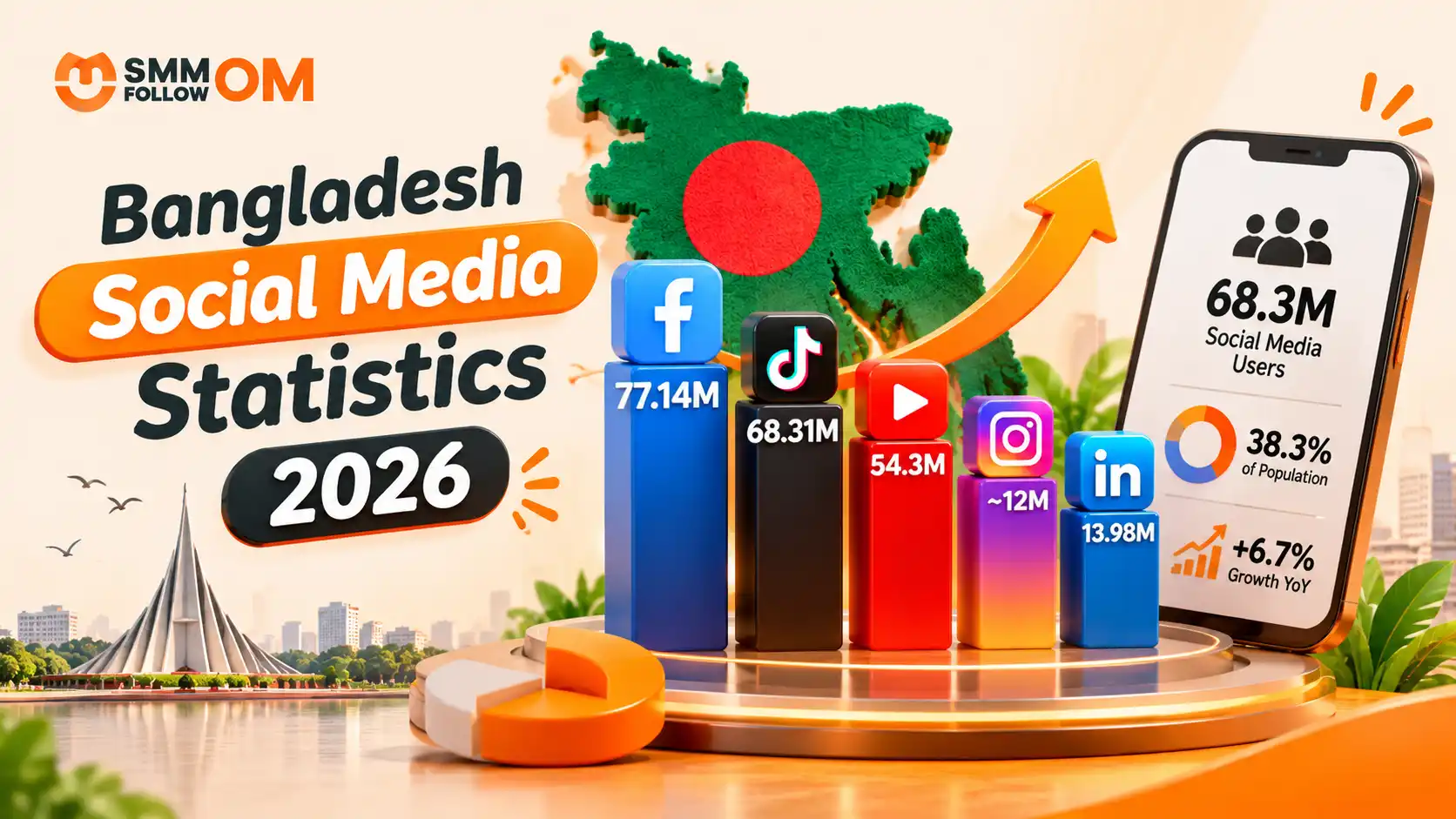
Bangladesh Social Media Statistics 2026
Bangladesh's social media audience continued to grow in 2026, but many articles still quote numbers collected in 2025. That matters. DataReportal's Digital 2026: Bangladesh report was published for the 2026 planning cycle, but most of its figures were collected in October 2025. DataReportal itself makes this date difference clear.
Read More
01NOV2026
How to Get More Views on TikTok? Organic & Paid Ways
You do not need thousands of followers to get more views on TikTok. TikTok's For You feed recommends videos based on what individual users may find relevant. TikTok says signals such as what people watch, skip, like, share, and comment on help shape those recommendations, with user interactions generally carrying more weight than other factors.
Read More
30OCT2026
Best Time to Post on TikTok in 2026: Day, Industry and Your Own Data
The best time to post on TikTok is Tuesday through Thursday between 2 PM and 6 PM local time. That does not mean 3 PM will work for every account. TikTok itself says the best posting time is unique to each account because audiences have different demographics and activity patterns. It recommends using audience analytics and testing what produces the strongest response for your content.
Read More